HTTP is request-response driven; the client asks and the server answers. But when building real-time dashboards, chat systems, gaming, or multi-cursor document editing, the server must push data to clients instantly without wasteful polling.
WebSockets provide a persistent, full-duplex TCP connection over a single socket, reducing HTTP overhead to almost zero after the initial handshake.
Building a Gateway with Nest.js & Socket.io
Nest.js simplifies WebSocket server management using the @WebSocketGateway() decorator:
import {
  WebSocketGateway,
  SubscribeMessage,
  MessageBody,
  ConnectedSocket,
  WebSocketServer,
  OnGatewayConnection,
  OnGatewayDisconnect,
} from '@nestjs/websockets';
import { Server, Socket } from 'socket.io';

@WebSocketGateway({
  cors: { origin: '*' },
  namespace: '/chat',
})
export class ChatGateway implements OnGatewayConnection, OnGatewayDisconnect {
  @WebSocketServer()
  server: Server;

  handleConnection(client: Socket) {
    console.log(`Client connected: ${client.id}`);
  }

  handleDisconnect(client: Socket) {
    console.log(`Client disconnected: ${client.id}`);
  }

  @SubscribeMessage('sendMessage')
  handleMessage(
    @ConnectedSocket() client: Socket,
    @MessageBody() data: { roomId: string; message: string; sender: string },
  ) {
    // Broadcast message to everyone in the room
    this.server.to(data.roomId).emit('newMessage', {
      sender: data.sender,
      message: data.message,
      timestamp: new Date(),
    });
  }

  @SubscribeMessage('joinRoom')
  handleJoinRoom(
    @ConnectedSocket() client: Socket,
    @MessageBody() roomId: string,
  ) {
    client.join(roomId);
    client.emit('joined', `Successfully joined room: ${roomId}`);
  }
}
Scaling Across Multiple Servers with Redis Pub/Sub
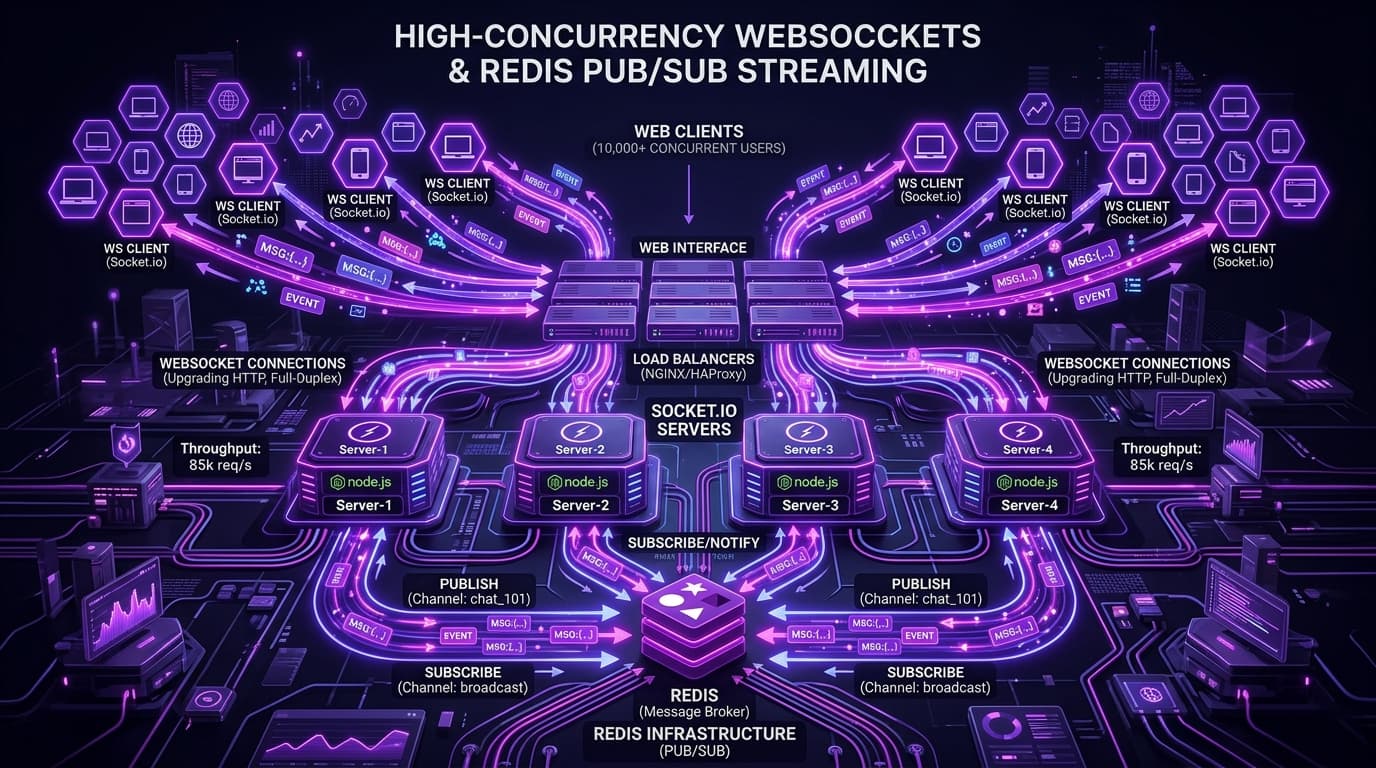
When scaling beyond a single server instance, clients connected to Server A cannot receive messages broadcast from Server B.
To solve this, we attach the Socket.io Redis Streams / Pub/Sub Adapter:
import { IoAdapter } from '@nestjs/platform-socket.io';
import { createAdapter } from '@socket.io/redis-adapter';
import { createClient } from 'redis';

export class RedisIoAdapter extends IoAdapter {
  private adapterConstructor: ReturnType<typeof createAdapter>;

  async connectToRedis(): Promise<void> {
    const pubClient = createClient({ url: 'redis://localhost:6379' });
    const subClient = pubClient.duplicate();

    await Promise.all([pubClient.connect(), subClient.connect()]);
    this.adapterConstructor = createAdapter(pubClient, subClient);
  }

  createIOServer(port: number, options?: any): any {
    const server = super.createIOServer(port, options);
    server.adapter(this.adapterConstructor);
    return server;
  }
}
With Redis Pub/Sub, any message emitted on any instance is published to the Redis channel, instantly notifying all other application instances to broadcast to their local connected clients!
Key Takeaways
- Always authenticate WebSocket handshakes using JWTs inside
canActivateguards. - Implement heartbeat pings and auto-reconnection logic on the client.
- Use Redis adapters to ensure horizontal scalability across multiple VPS containers behind Nginx load balancers.