Deploying Node.js applications to a Linux VPS often involves repetitive manual steps: SSHing into the server, pulling the latest git commits, running npm installs, compiling builds, and restarting process managers.
While hosted CI/CD tools like GitHub Actions are popular, running a self-hosted webhook-driven deployment pipeline directly on your Ubuntu VPS provides a lightweight, blazingly fast, and completely free deployment pipeline with zero runner minute limits.
In this guide, we walk through the architecture and implementation of an automated deployment system that triggers whenever you push to your main branch, validates security via HMAC-SHA256 signatures, gracefully reloads PM2, and posts rich real-time deployment status embeds to Discord.
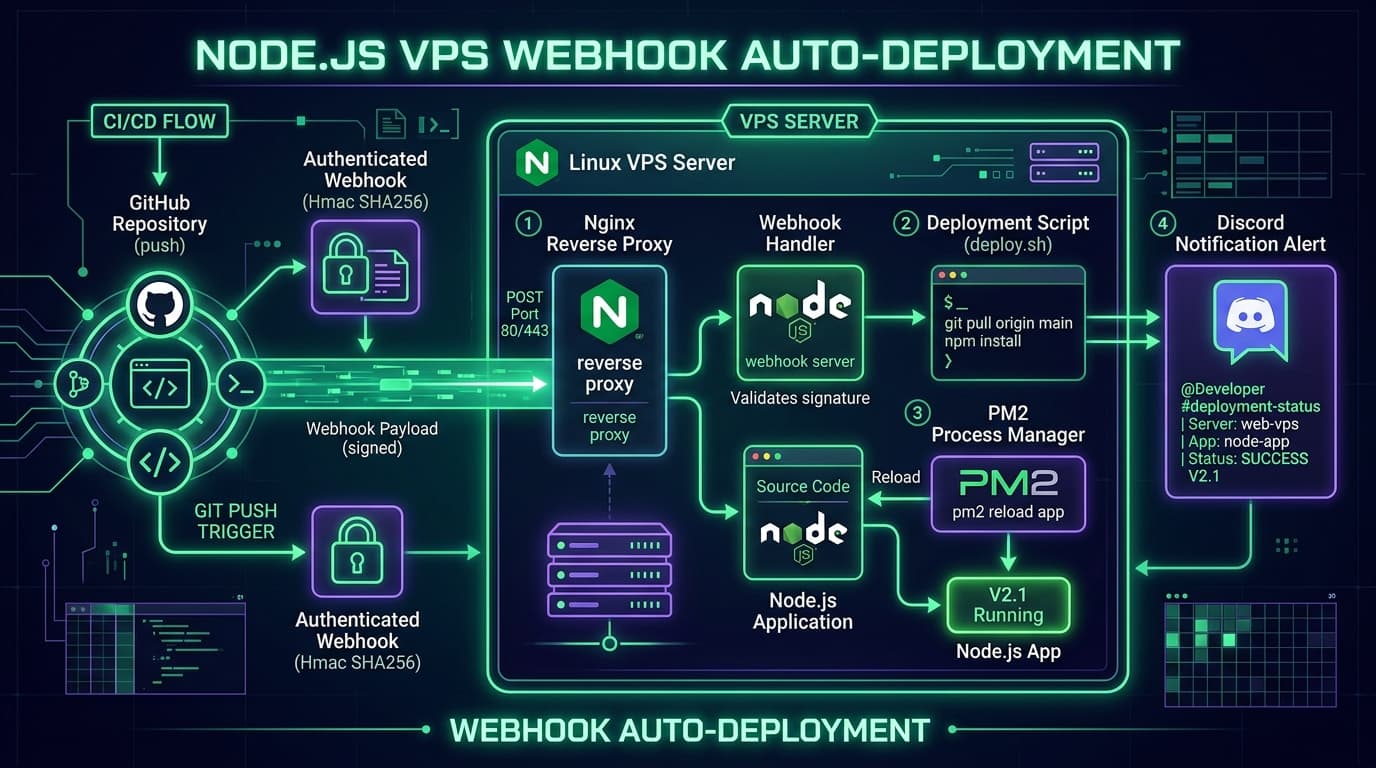
The Deployment Pipeline Flow
When you push code to GitHub:
- Git Push: A commit is pushed to the
mainbranch. - Webhook Dispatch: GitHub dispatches an HTTPS POST request with an HMAC-SHA256 signature to your VPS.
- Nginx Reverse Proxy: Nginx receives the request on port 443 with SSL and forwards it to the local webhook service.
- Signature Verification: The Node.js webhook handler computes the HMAC hash and verifies authenticity using
crypto.timingSafeEqual. - Automated Script Execution:
deploy.shpulls code viagit fetchandgit reset --hard, executesnpm ci, and triggers build tasks. - PM2 Reload: PM2 reloads the application with zero downtime.
- Discord Notification: A detailed embed with deployment status, commit author, commit message, and execution duration is sent to your Discord channel.
| Step | Component | Role / Purpose |
|---|---|---|
| 1. Trigger | GitHub Webhook | Detects pushes to main & sends payload |
| 2. Ingress | Nginx Reverse Proxy | SSL Termination & routing to port 3000/4000 |
| 3. Security | Node.js Webhook Server | HMAC-SHA256 verification of x-hub-signature-256 |
| 4. Build & Run | Bash Script + PM2 | Clean dependency install, build, & zero-downtime reload |
| 5. Monitoring | Discord Webhook | Real-time success or failure notifications |
1. Preparing the Ubuntu VPS
First, update system packages and install Git, Nginx, and curl:
sudo apt update && sudo apt upgrade -y
sudo apt install -y git nginx curl
Install Node.js (v22.x LTS) and global PM2:
curl -fsSL https://deb.nodesource.com/setup_22.x | sudo -E bash -
sudo apt install -y nodejs
sudo npm install -g pm2
Verify installations:
node -v
npm -v
git --version
nginx -v
pm2 -v
2. Setting Up the Node.js Application
Create a dedicated application directory under /var/www with appropriate user ownership:
sudo mkdir -p /var/www
sudo chown -R $USER:$USER /var/www

cd /var/www
git clone https://github.com/YOUR_USERNAME/YOUR_REPOSITORY.git myapp
cd myapp

npm ci
npm run build # (if applicable)
Launch the application under PM2 and configure it to restore on server reboots:
pm2 start npm --name myapp -- start
pm2 save
pm2 startup # Run the output command provided by PM2
3. Writing the Production Deployment Script
Create an automated deployment script in /var/www/myapp/scripts/deploy.sh:
#!/bin/bash
set -Eeuo pipefail

APP_DIR="/var/www/myapp"
BRANCH="main"
APP_NAME="myapp"

cd "$APP_DIR"
echo "==> Deployment started"

# Fetch latest code and force working tree to match remote
echo "==> Fetching latest code"
git fetch origin "$BRANCH"

echo "==> Resetting working tree to origin/$BRANCH"
git reset --hard "origin/$BRANCH"

echo "==> Installing dependencies"
npm ci

# Run build if a build script exists in package.json
if npm run | grep -q " build"; then
    echo "==> Building application"
    npm run build
fi

echo "==> Reloading PM2 application with zero downtime"
pm2 reload "$APP_NAME" --update-env

echo "==> Deployment completed successfully"
Make the script executable:
chmod +x /var/www/myapp/scripts/deploy.shWhy `git fetch` and `git reset --hard`?
Using git reset --hard origin/main guarantees that the deployment server exactly mirrors the remote repository state. It eliminates merge conflicts and discarded dirty files that can break automatic deployments.
4. The Secure Webhook Receiver (Node.js & Express)
The webhook server listens for incoming GitHub requests and securely verifies the payload signature before executing deploy.sh:
const express = require('express');
const crypto = require('crypto');
const { execFile } = require('child_process');
const axios = require('axios');

const app = express();
app.use(express.raw({ type: 'application/json' }));

const SECRET = process.env.GITHUB_WEBHOOK_SECRET;
const DISCORD_WEBHOOK = process.env.DISCORD_WEBHOOK_URL;

function verifySignature(req) {
  const signature = req.headers['x-hub-signature-256'];
  if (!signature) return false;

  const hmac = crypto.createHmac('sha256', SECRET);
  const digest = 'sha256=' + hmac.update(req.body).digest('hex');

  const checksum = Buffer.from(digest, 'utf8');
  const expected = Buffer.from(signature, 'utf8');

  return checksum.length === expected.length && crypto.timingSafeEqual(checksum, expected);
}

app.post('/github-webhook', (req, res) => {
  if (!verifySignature(req)) {
    return res.status(401).send('Invalid signature');
  }

  const payload = JSON.parse(req.body.toString());

  // Only deploy on push to main branch
  if (payload.ref === 'refs/heads/main') {
    res.status(202).send('Deployment initiated');

    execFile('/var/www/myapp/scripts/deploy.sh', async (error, stdout, stderr) => {
      const isSuccess = !error;
      const message = isSuccess ? '✅ Deployment Succeeded' : '❌ Deployment Failed';

      // Send status embed to Discord
      if (DISCORD_WEBHOOK) {
        await axios.post(DISCORD_WEBHOOK, {
          embeds: [{
            title: message,
            color: isSuccess ? 0x62A92B : 0xE53E3E,
            fields: [
              { name: 'Repository', value: payload.repository.full_name, inline: true },
              { name: 'Committer', value: payload.pusher.name, inline: true },
              { name: 'Commit', value: payload.head_commit.message }
            ],
            timestamp: new Date().toISOString()
          }]
        });
      }
    });
  } else {
    res.status(200).send('Ignored: not main branch');
  }
});

app.listen(3333, () => console.log('Webhook server running on port 3333'));
5. Storing Secrets Securely
Keep your webhook secrets in an environment file protected with restricted permissions:
sudo nano /etc/github-webhook.envAdd your secrets:
GITHUB_WEBHOOK_SECRET=your_long_random_hex_secret_here
DISCORD_WEBHOOK_URL=https://discord.com/api/webhooks/YOUR_ID/YOUR_TOKEN
Restrict permissions so only root or authorized users can read it:
sudo chmod 600 /etc/github-webhook.env6. Nginx Reverse Proxy Configuration
Configure Nginx to route traffic to both your web application and the webhook endpoint:
# /etc/nginx/sites-available/myapp.conf
server {
    server_name myapp.yourdomain.com;

    location / {
        proxy_pass http://localhost:3000;
        proxy_http_version 1.1;
        proxy_set_header Upgrade $http_upgrade;
        proxy_set_header Connection 'upgrade';
        proxy_set_header Host $host;
        proxy_cache_bypass $http_upgrade;
    }

    # Webhook endpoint routed to internal listener
    location /github-webhook {
        proxy_pass http://localhost:3333/github-webhook;
        proxy_http_version 1.1;
        proxy_set_header Host $host;
        proxy_set_header X-Real-IP $remote_addr;
        proxy_set_header X-Forwarded-For $proxy_add_x_forwarded_for;
    }
}
Enable the site and obtain a free Let's Encrypt SSL certificate:
sudo ln -s /etc/nginx/sites-available/myapp.conf /etc/nginx/sites-enabled/
sudo nginx -t
sudo systemctl reload nginx
sudo certbot --nginx -d myapp.yourdomain.com
7. Configuring GitHub & Discord Webhooks
- GitHub Settings: In your GitHub repo, go to Settings > Webhooks > Add webhook.
- Payload URL:
https://myapp.yourdomain.com/github-webhook - Content type:
application/json - Secret: Enter the secret configured in
/etc/github-webhook.env - Which events: Select "Just the push event"
- Discord Channel: In Discord channel settings, create a new webhook integration and copy the URL into your environment file.
8. Testing the Full Pipeline
Now, make any code change locally and push to GitHub:
git add .
git commit -m "feat: improve realtime user status indicator"
git push origin main
Within seconds:
- GitHub dispatches the webhook payload to your VPS.
- The Node.js webhook server validates the HMAC signature.
deploy.shpulls, builds, and instructs PM2 to perform a zero-downtime reload.- Discord chimes with a rich green embed notification confirming deployment success!
Conclusion
By implementing this webhook auto-deployment architecture, you get an ultra-fast, robust CI/CD pipeline on your own Linux VPS without depending on third-party runner minutes or complex setups.
Check out the full repository and deployment scripts on [GitHub: nodejs-vps-webhook-auto-deployment](https://github.com/imtiazhasanBD/nodejs-vps-webhook-auto-deployment).