As full-stack developers, we often write repetitive boilerplate code to handle recurring tasks: sending notifications to Slack, processing email verification, synchronizing CRM records, or creating reporting digests.
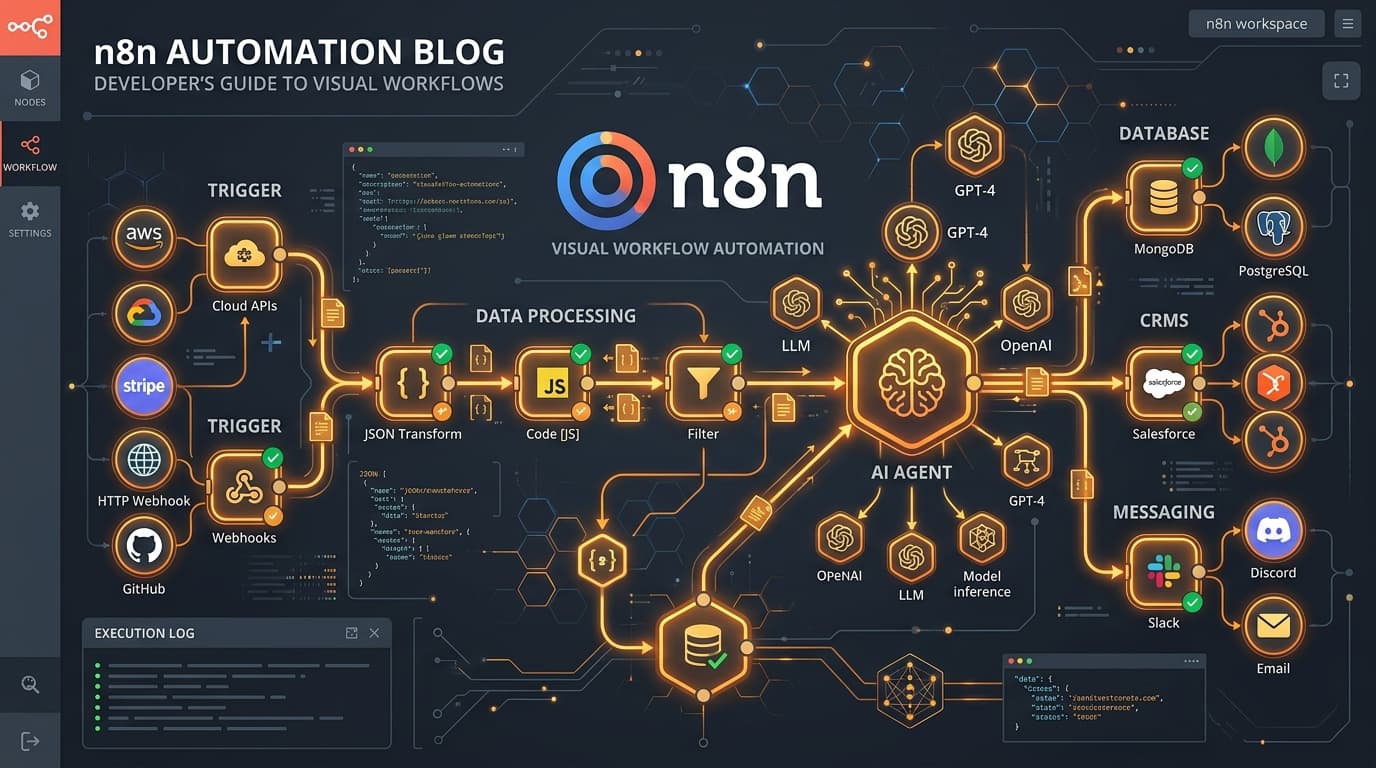
n8n is a fair-code, self-hostable workflow automation tool that lets you connect disparate services and complex business logic using an intuitive node-based visual interface combined with custom JavaScript/Python scripting.
Why Host n8n Over Zapier or Make?
- Self-Hosted & Cost-Free Execution: Run millions of tasks on your own VPS with no per-action pricing limits.
- Direct Database & Internal Network Access: Safely connect to private MongoDB, PostgreSQL, and internal Redis instances inside your Docker network.
- Custom Code Nodes: Write arbitrary Node.js scripts directly within workflow steps.
- Native AI & LLM Integrations: Easily chain OpenAI, Anthropic, or Ollama models with vector stores like Pinecone or Qdrant.
Real-World Use Case: Automated Customer Support & AI Triage
Here's how a production n8n automation pipeline operates in our stack:
- Webhook Node: Listens for
POST /api/support-ticketemitted by our Next.js/Nest.js frontend application. - Data Transformation (Code Node): Sanitizes and formats ticket parameters using JavaScript.
- OpenAI Agent Node: Analyzes ticket urgency, categorizes issue type, and generates a recommended reply.
- Conditional IF Node:
- If priority is Urgent: Triggers a notification in the on-call Discord/Telegram channel and sends an SMS via Twilio.
- If priority is Normal: Creates an issue in Jira/GitHub and stores ticket metadata in PostgreSQL.
- Customer Confirmation: Dispatches a branded email via SendGrid with a unique ticket tracking URL.
// Custom JavaScript function inside an n8n Code Node
for (const item of $input.all()) {
  const { subject, body, customerEmail } = item.json;

  // Calculate priority score based on keywords
  const isUrgent = /(urgent|crash|broken|down|refund)/i.test(subject + " " + body);

  item.json.priority = isUrgent ? "HIGH" : "NORMAL";
  item.json.processedAt = new Date().toISOString();
  item.json.sanitizedEmail = customerEmail.trim().toLowerCase();
}

return $input.all();
Integrating n8n with Nest.js / Next.js
Triggering an n8n workflow from your backend is as simple as firing an authenticated HTTP request:
import axios from 'axios';

export async function triggerN8nWorkflow(payload: Record<string, any>) {
  try {
    await axios.post(process.env.N8N_WEBHOOK_URL, payload, {
      headers: {
        'X-N8N-API-KEY': process.env.N8N_SECRET_KEY,
      },
      timeout: 5000,
    });
  } catch (error) {
    console.error('Failed to trigger n8n automation:', error.message);
  }
}
Conclusion
Embracing tools like n8n frees software engineers from writing mundane glue code, enabling you to focus on core product architecture, performance optimization, and superior user experiences.